
Run As Date (Use Any App For Life Time Free)
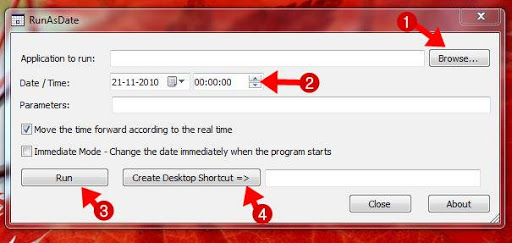
INSTRUCTIONS :
1.Close your Smartshow 3D
2.Downlooad and Open Run As Date which is given below
3.Open your .exe file (here i take SmartShow 3D)
4.Then change the date to the next day **Recommended
5.Give a Name to your Application
6.Finally click on create shortcut
And that's it .. Now you can use it for life time...
!!! If you have any Doubt just follow my instructions , how i did it in the video Showing Below :
You can Download Your "Run As Date" by clicking on Download link given below :
 #Earn Money Free


